
Maps on CD
By James Carron
With the ongoing boom in home computers and Internet use, it was only a matter of time before some enterprising company committed the country's mapping to CD-Rom for domestic use. Anquet Maps is targeting hillwalkers, cyclists and others who enjoy outdoor recreational pursuits with its range of software based on Ordnance Survey and Harvey's mapping.
The whole of the UK is covered through a series of titles, but the main ones are expensive, at £120 a throw. For that, though, you do get a vast amount of information and a very easy to use viewing platform. While there is an awful lot to commend the product, it is let down by a couple of niggles.
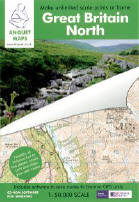
The UK is split into two packages - Great Britain North, which includes all of Scotland, the Lake District, Yorkshire Dales and Yorkshire Moors, and Great Britain South, covering the rest of England and Wales. Both contain seamless 1:50,000 scale mapping plus an overview map and a 1:250,000 scale GB road map.
There are cheaper packages available too from Anquet, covering popular walking areas and costing £35 each. Again containing 1:50,000 scale mapping, they cover Scotland, the Lake District, The Peak District, Wales and the South Coast of England. The Scottish title covers the Cairngorms, Loch Lomond and the Trossachs, Skye and Arran.
A Superscale range featuring 1:25,000 scale maps from Harvey's Maps has two titles - the Scottish Highlands and the Lake District. The former includes Torridon, Skye, Ben Nevis, Ben Lomond, Arran, the Galloway Hills, Cairngorms and Pentlands.
I tested a copy of the Great Britain North package. It includes an installation disc and three further dics on which the mapping is stored. Once the software has been installed, you can either commit the mapping to your hard drive, or run them from the CDs, saving hard drive space. A hard drive installation takes up 700 Mb of space per CD, but allows the software to run more quickly. If you buy Great Britain North, then decide to add Great Britain South, all of the data will be available from a single application and will appear to be seamless on the scheme.
Once installed, the mapping is easily viewed through Anquet's clear and easy to use front end. Scrolling around the map is fast and easy using your mouse and you can zoom in and out.
You can find places & towns, villages, hills, lochs, etc - using the software's search engine, either by entering the name, grid reference or latitude/longitude. If it's a popular name, such as Meall Dearg, the search engine returns all matches with geographical locations and OS grid references. Alternatively, you can search the directory of over 250,000 location names.
Of particular interest to walkers and cyclists is the option to 'lay' your own routes and waypoints on to the mapping. This takes a few minutes to master and the 'help' section in the software offers a better introduction to route creation than the accompanying 12-page instruction booklet. Basically you put down your first waypoint and from there use the mouse to overlay paths, adding waypoints as you go (although with text notes, if you wish). Once you have completed your route, you can view a graphic height profile, showing the ups and downs, and textual route information, including grid references for the start and finish points, the distance and time it should take, based on Naismith's formula, and height ascended.
Now you can save your route, or print it out. The software allows you to select exactly which bit of the map you want to print, and the size you want it at.
Paths or routes created using the Anquet software can also be saved to any Garmin or Magellan GPS unit from the GPS menu. The first task is to select your unit from the options listed then the job of transferring waypoints and routes is easy.
Now a couple of niggles. My first is the refusal of the software to allow you to select an area of mapping, with or without an overlaid route, and then save it as a jpeg or bitmap for use elsewhere on the computer. The back of the box states quite clearly that you can save your routes and share them by email or on the web. Only once you've bought the thing, however, do you discover that while you can share your routes by email or on the web, the data can only be read by people who have the Anquet software which saves your routes as their own .arf files. Presumably this is done to protect the company's investment, but it is frustrating. Having forked out £120, I did expect a bit more flexibility from the package.
The only other criticism is fairly minor and one that could easily be rectified. The place search is accent-specific so, short of cutting and pasting from another application, it's not possible to find names with accents, such as R&m.
These complaints aside, this is a very useful and easy to use package which will appeal not only to walkers and cyclists but also folk who simply enjoy studying maps. The £120 price tag may seem steep, but you are getting the content of 107 Landranger maps, which at £5.99 a throw, works out at just over £640.
Requirements
Minimum system Windows 98/ME, 32 Mb memory.
Recommended system Windows 2000/XP, 500 MHz processor, 64 Mb memory.
For more info log on to www.anquet.co.uk